
A scale you can trust
CREW25 reads each sheet’s scale from its label. If labels disagree or none is found, the sheet says Check scale, because a wrong scale would misprice the whole job.
Takeoff software for builders and trades, on the job itself: drop in the PDF plans, check the scale, and measure lengths, wall areas, areas and counts on screen. Each item is priced from your price book, and one button turns the takeoff into a quote.
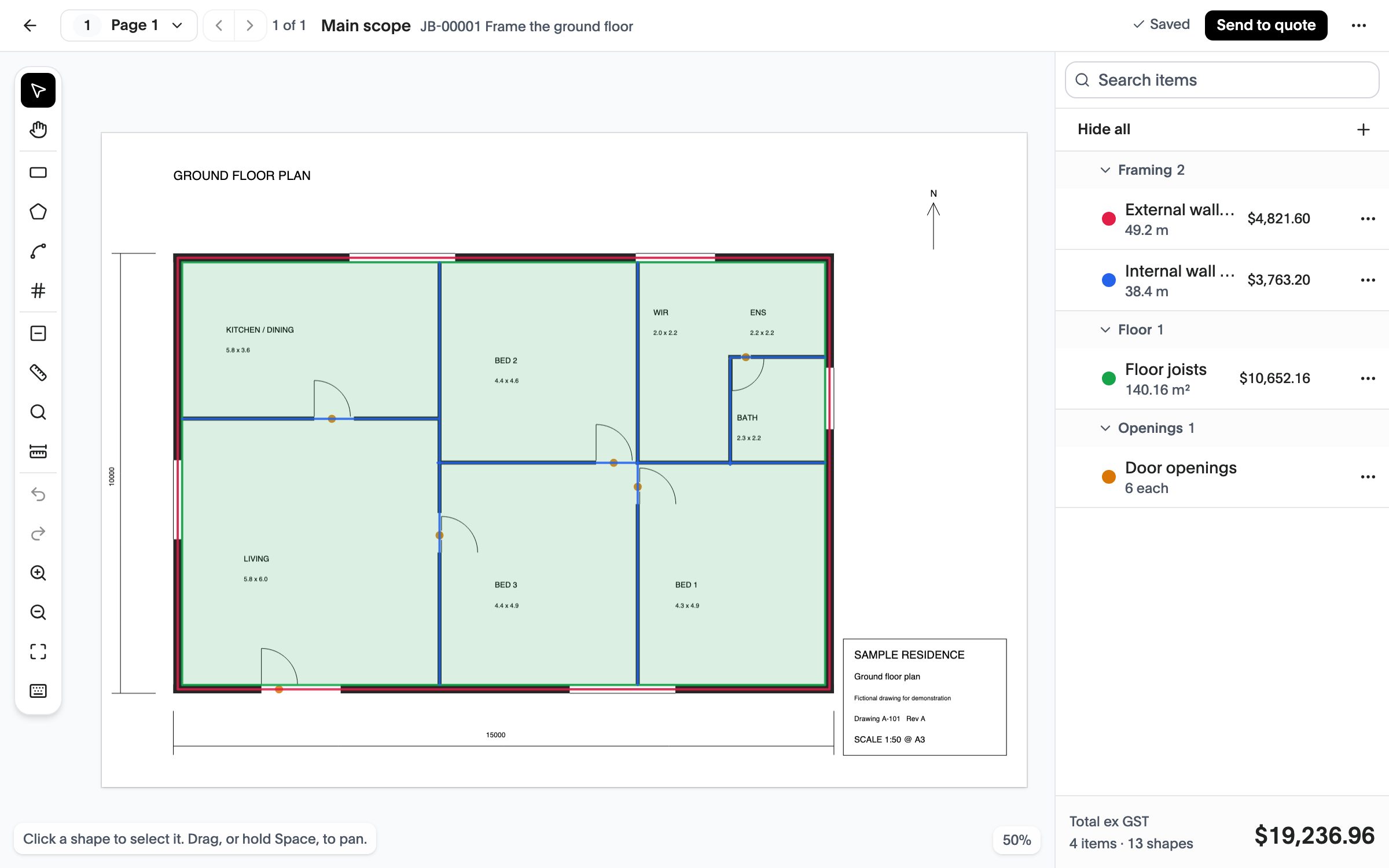
CREW25 reads each sheet’s scale from its label. If labels disagree or none is found, the sheet says Check scale, because a wrong scale would misprice the whole job.
Each item is priced from a price book item or a bundle, so a metre of stud wall carries its studs, plates, fixings and labour.
Keep the main scope, a variation and an option as separate takeoffs, each sending to its own quote.
Everything in this list is in the product now.
Open the job’s Takeoffs tab and drop in the plans. Each page becomes a sheet with its own scale.
Choose an item and draw on the sheet. Lengths and areas show live as you draw.
The takeoff becomes a draft quote, priced from your price book, ready to check and send.
Last updated October 2026
Start a 14-day free trial with no card required, or book a demo and we’ll walk you through it.